Case study
Imagility — Making complexity work across an immigration ecosystem
Designing a connected immigration platform for complex legal workflows — from fragmented processes to a unified product ecosystem.
- Enterprise SaaS
- Product Strategy
- UX Architecture
- Workflow Design
- Research
- AI & Automation
- Design Leadership
- Role
- UX / Product Design Lead — Head of UX-level contribution
- Company
- Imagility
- Product
- Enterprise SaaS platform for immigration law firms and businesses
01
The product
One platform. Multiple workflows. One connected experience.
Immigration work involves people, cases, documents, forms, deadlines, evidence and complex legal processes — often across multiple teams and systems.
Imagility was designed as an end-to-end platform to bring these workflows together and reduce friction involved in managing immigration cases. The platform supported attorneys, legal teams, petitioners, beneficiaries and administrators.
My role evolved beyond designing individual screens. I worked on the overall product experience and architecture, helping define how different parts of the platform should work together.
02
The challenge
The challenge wasn't just designing screens. It was connecting an ecosystem.
- Beneficiary and petitioner information
- Forms
- Documents and evidence
- Case activities
- Petitions
- Requests for Evidence
- Attorney responses
- Compliance requirements
- Multiple stakeholders
- Repetitive data entry
"How might we create a scalable product ecosystem that simplifies complex immigration workflows while giving each user the right information, tools and actions at the right time?"
03
My role
My contribution covered the product at multiple levels.
- Product & UX strategy — helping define the overall experience and architecture.
- Service & workflow design — mapping users, processes, systems and relationships.
- Research & validation — user interviews, usability testing, personas, reports and expert reviews.
- Product design — major areas including Case Management, Case Overview, forms and petition workflows.
- Design leadership — guiding the team, establishing direction and ensuring consistency.
- AI & automation — OCR/data extraction and AI-assisted RFE response experiences.
"I was not the sole designer executing every screen. My role was to understand the problem, establish UX direction, contribute hands-on where needed, validate the experience and guide the wider team."
04
Understanding users
Imagility wasn't designed for one set of users.
Attorneys & legal teams
Manage cases, review information, prepare petitions, respond to evidence requests and produce legally appropriate documentation.
Petitioners
Provide information, documents and supporting evidence while understanding what is required.
Beneficiaries
Provide personal details and need visibility into their information, case status and required actions.
Administrators & operations
Manage information, workflows, users, permissions and operational processes.
05
Research & discovery
Before designing the interface, I mapped the work.
Discovery focused on roles, workflows, information relationships, dependencies, decision points, approvals, notifications, reporting, terminology and existing product patterns.
Recurring themes included fragmented systems, repetitive information entry, manual processes, role-specific needs and opportunities for automation.
"The opportunity was not simply to digitise existing processes, but to connect them."
06
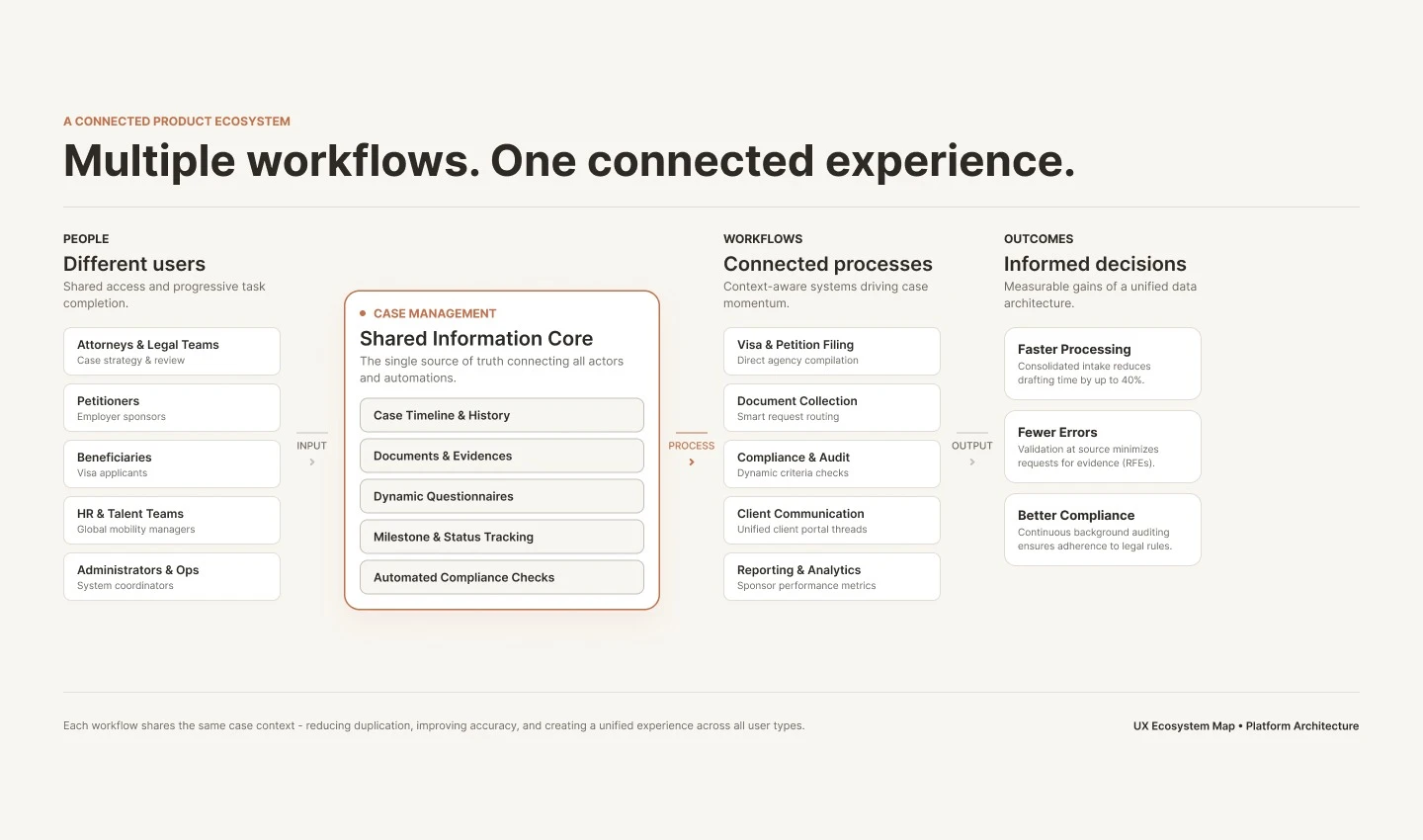
The product ecosystem
Imagility became a system of connected products.
The platform included Case Management, Forms & Petition Builder, Documents, RFE Builder, Forms Designer, I-9 Compliance and Talent Acquisition / HR experiences.
The key shift was thinking of the ecosystem as connected rather than treating each interface as an isolated product.
07
Case Management
One case. Multiple connected workflows.
Case Management brought people, forms, petitions, documents and activities together around the case. The central questions were: Where does this case stand? What needs attention? What happens next?
08
Forms & Petitions
Turning complex petition work into a visible, connected workflow.
Connected data allowed information from beneficiary and company profiles to flow into relevant forms, reducing repetitive entry. The Step Timeline made progress visible and helped users understand what was complete, in progress, required and owned.
09
Documents
Keeping evidence connected to the case.
The experience connected document requests, uploaded evidence, checklists and document tracking back to the case workflow.
10
AI & automation
Bringing AI into the workflow — not adding AI for the sake of AI.
AI became valuable for repetitive, information-heavy tasks. One example was OCR and data extraction. Another was AI assistance in the RFE Response Builder. The AI experience supported suggested content, prompts, response assistance, review and user-controlled insertion.
"AI should assist the expert, not replace the expert."
11
Design system & consistency
Creating consistency across a growing product.
The design system was developed by the team. My role was primarily to guide direction, ensure consistency and connect the system to the wider product experience.
- Multiple products
- Different workflows
- Reusable patterns
- Consistent interactions
- Faster design and development
- A coherent experience across the ecosystem
12
Outcome
From individual workflows to a connected product ecosystem.
My work spanned: Strategy → Service Architecture → Research → Workflows → UX → AI → Automation → Design Direction.
The biggest impact was not simplifying a single screen. It was creating design foundations for a product ecosystem that could make complex immigration work feel connected, understandable and scalable.
"Complexity isn't the enemy. Unorganised complexity is."
Designing enterprise products at this scale is less about making every screen simpler in isolation and more about making people, information, workflows and systems work together.
Working on something similarly complex?