Case study
Forms Designer — When the real product is the system behind the screen
Turning a 3–4 week development cycle into a 2–3 day scalable configuration workflow.
- Enterprise SaaS
- Product Strategy
- Systems Thinking
- Configuration
- Workflow Architecture
- Company
- Imagility
- Product
- Admin-facing form configuration system
01
The business problem
We couldn't build forms fast enough.
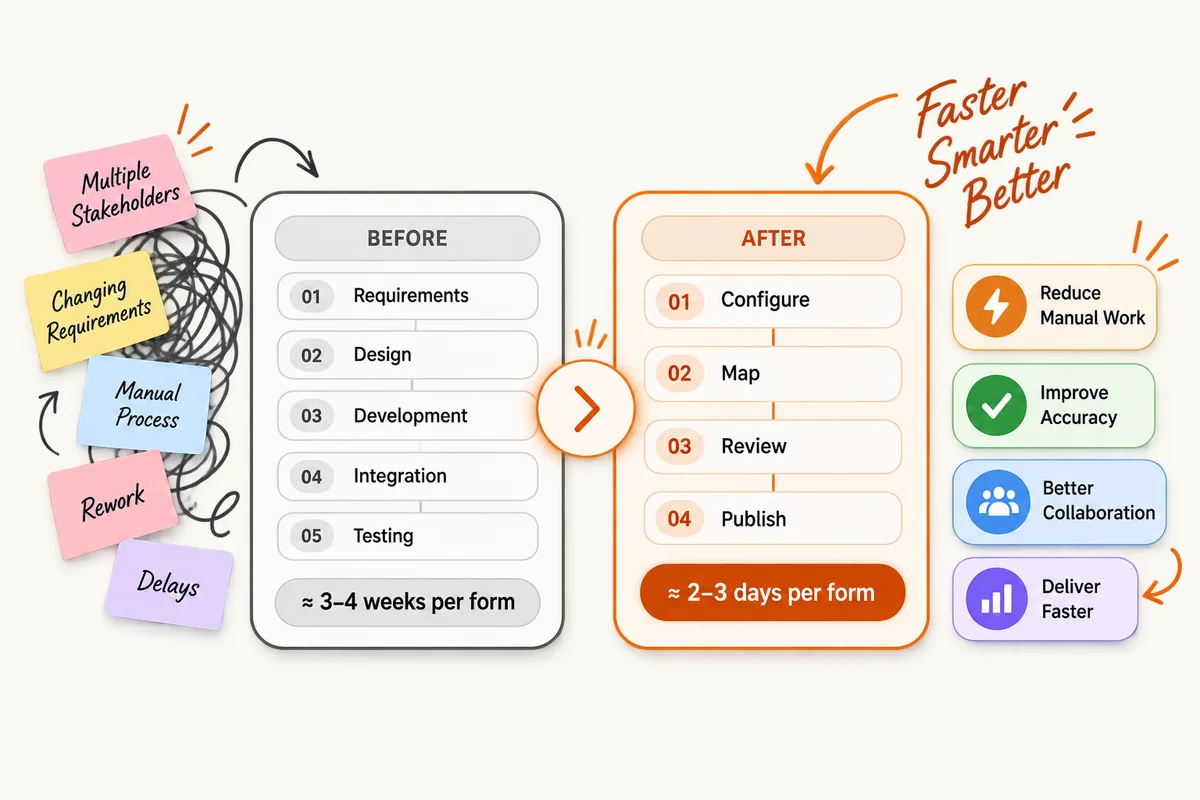
Every new immigration form created a dependency on requirements, design, development, integration and testing. A single form could take approximately 3–4 weeks from requirement to completion.
The problem was not just efficiency. It created a product scalability constraint.
"How might we enable the product team to create and configure new forms without rebuilding the underlying experience every time?"
02
Rethinking the model
From individual forms to a reusable system.
We looked for patterns shared across forms: reusable fields and components, administrator configuration, flexible form structures, backend mappings and a manageable setup-to-publishing workflow.
"How do we build a system that can build many forms?"
03
The solution
A visual system for building forms.
Forms Designer became an admin-facing workflow for creating digital forms from existing paper/PDF forms, with two starting points: convert an existing form, or build from reusable components.
04
Reusable building blocks
Create once. Reuse across forms.
The model separated the complexity of the technical foundation from the complexity of configuration. Administrators could focus on what the form needed rather than how every field needed to be built.
05
Constructing the form
Turning a complex document into structured steps.
The interface allowed fields to be selected and grouped into meaningful steps, with a live preview of the resulting structure. The design question was not simply how to reproduce the PDF — it was what information belongs together, what should be one step, how the sequence should work and how the resulting digital form should be experienced.
06
Step sequencing & visa mapping
Build the structure once. Configure its applicability where needed.
Administrators could organise generated steps, reorder them, edit names, create steps and associate them with visa types — avoiding an entirely separate form experience for every scenario.
07
Field mapping
Connecting the form to data already in Imagility.
Available data included petition, beneficiary, petitioner and attorney-related fields. The technical mapping was part of the reusable component architecture so administrators could focus on configuration.
08
Review before publishing
Make the final configuration visible before it reaches users.
The Review Summary brought together Form Details, Form Mapping and Letter Details, creating a final checkpoint before publishing.
09
The system behind the experience
The most important design decision wasn't the drag-and-drop interaction. It was the system behind it.
- Reusable components
- Backend mapping
- Visual configuration
- Structured workflows
- Reusable form logic
- Review and publishing
Together, these created a configuration layer between the product team and the development team.
10
My role
I worked across the UX team to shape the overall experience and establish the design direction for Forms Designer.
- Product & UX strategy
- System thinking
- Workflow architecture
- Interaction design
- Design system thinking
- Cross-functional collaboration
- Complex information design
- Design leadership
- Usability and validation
11
Impact
From a development bottleneck to a scalable configuration model.
This reduced manual effort and dependency on developers for every new form configuration. More importantly, the team moved from building forms one at a time to creating a system capable of producing many forms.
12
Bigger design lesson
"The real product wasn't the form builder. It was the ability to scale the product without scaling development effort at the same rate."
When a business repeatedly creates the same type of thing, the opportunity may not be to make creation faster. It may be to change who creates it and how the system enables them to create it.
Working on something similarly complex?